
Some who know me know that I obsess a bit over my Home Screen. I’m pretty picky about the aesthetic, but I also prioritize the accessibility of apps I use frequently and apps I want to use more frequently. I also love when people share their Home Screens, as it gives me new app ideas and an idea of how a person uses their phone. I recently made a few changes, so I thought now would be a good time to share that here.

The first 2 screens are the most important. This is where I try to fit everything I use regularly. Arranging my Home Screen definitely helps remind me how many apps I actually use on the regular.
First Screen
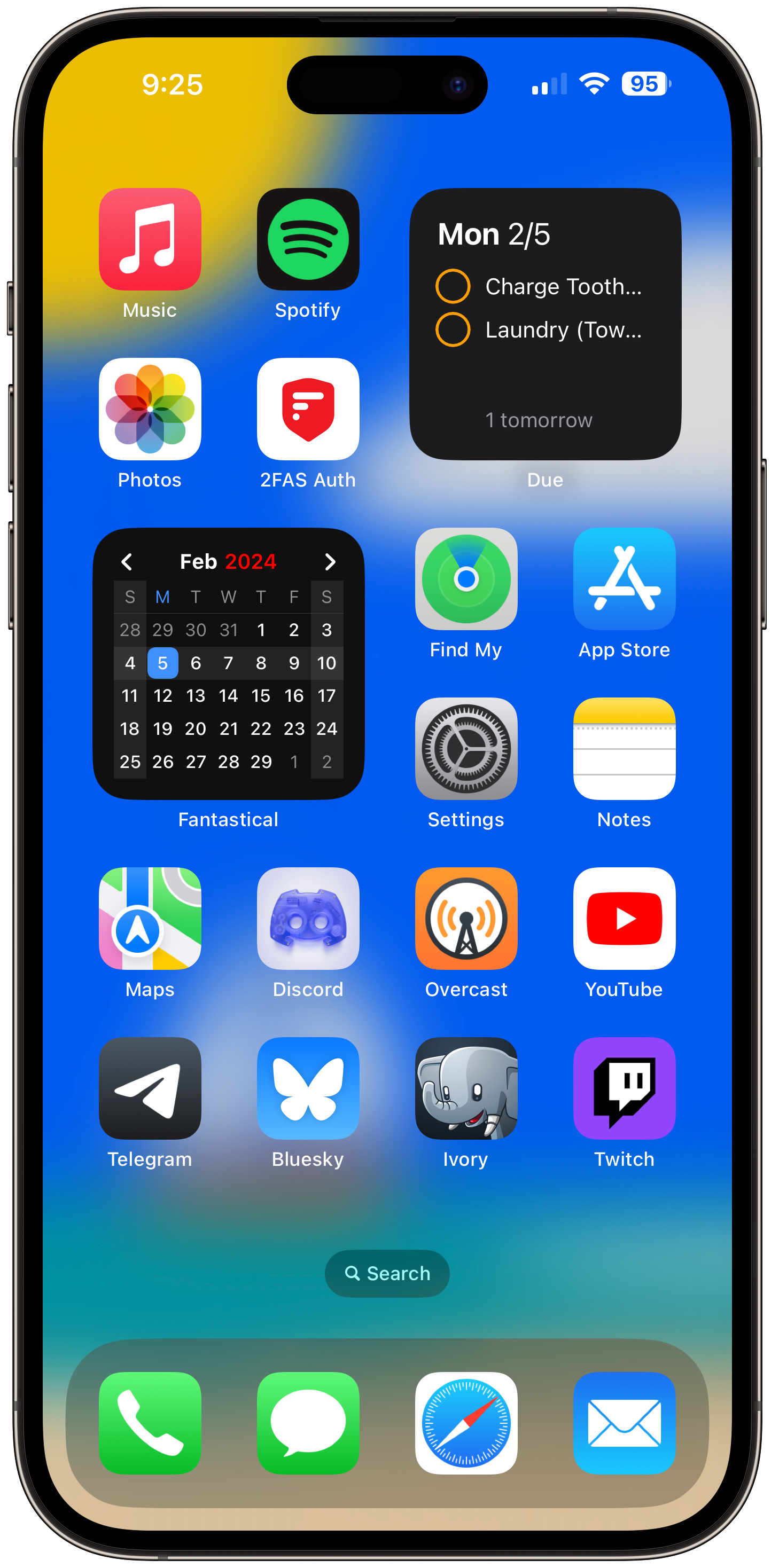
Music
These days, I have Apple Music primarily for the iCloud Music Library feature. I’ve got a number of songs from my collection that I’ve either bought before on iTunes or had ripped from other media and it’s nice to be able to keep those in a cloud music collection to stream like the rest of my music activity.
Spotify
Here’s where the bulk of my music listening comes from. The discovery on Spotify won me over from Apple Music years ago, and while I’m sometimes tempted to use Apple Music for all of my listening, discovering new music is still too good to give up Spotify. Even if their business decisions make me wish it was easier to give up…
Photos
I use iCloud for my Photos backup, so naturally all of my photos activity goes through there. My phone is my only camera, so it’s the easiest way to be comfortable with my photos being safe. Plus, I use Shared Photo Albums often with family and friends.
2FAS Authenticator (link)
Enable multi-factor authentication on all of your accounts! I landed on 2FAS for my Authenticator after Raivo was sold to some unknown company that didn’t give me any reason to trust them. I used Authy before that, but I didn’t like the interface, or how it didn’t have an export option. At least Raivo had that, making the switch easy. Anyway, 2FAS is my favourite so far, and even has an “Active search on startup” setting, which brings your keyboard up when you open the app, so you can quickly search for the code you need. Highly recommend it!
Find My
This one’s pretty self-explanatory, I use it to see the location from friends and family who’ve shared, and I use it to track my device locations as well.
App Store
I’ve had the App Store on my first Home Screen since I first got my iPod Touch in 2010. Most of the time I just use it as a quick path to the Updates section - I don’t have automatic updates, even though I never avoid updating apps, because I just like to see the update notes (for apps that include them anyway).
Settings
Self-explanatory. It takes enough taps to get to things in there already, might as well keep the app itself up front and easily accessible.
Notes
I don’t end up in here every day, but I find it essential to have something available at a quick moment to jot stuff down. I’ve also taken to using Notes for gift ideas (whether sharing my own or others’ shared lists). I’d love if Notes gained Markdown support though.
Maps
Apple Maps has been perfectly good for years now. I’ll dip into Google Maps occasionally still, as I find the traffic reporting to be a bit more reliable there, but for directions, this app does me very well.
Discord
I spend most of my phone time in Discord, I’d say. I’m a community manager and administrator in one Discord, and active member in several others. Plus, I work on several Discord Bots, so I’m just in Discord all the time.
Overcast (link)
Years ago, I was using Pocket Casts for all of my podcast listening. One the pandemic hit though, I wasn’t driving around as much, and my podcast listening screeched to a halt. So I abandoned all of my subscriptions for a few years. Recently, I’ve gotten back into some podcasts, so I thought I’d try Overcast this time. I’ve been very pleased with it. I’m still rethinking its location on my Home Screen, since I use it 99% of the time from CarPlay, but I haven’t convinced myself of an app to take that spot yet.
YouTube
I don’t do a lot of YouTube watching on my phone, but often it’s handy to have there for easy access.
Telegram
Some of my friends use this for chats, and I was able to convince the one group chat I had left in Facebook Messenger to switch over to Telegram a few years back, so I barely ever need to check FB’s chat app now. I like Telegram for its features and I enjoy using it much more than WhatsApp. Plus, the Saved Messages chat is a very handy way to pass links, files, etc. between my phone and my Windows PC.
Bluesky
In light of the last year and some of Twitter’s happenings, Bluesky took the spot on my Home Screen that Twitter held for many years. I’m enjoying that Bluesky is quieter, and that there’s no algorithmic timeline being forced on you. I also appreciate Bluesky as a new, and far more open, platform, because it’s exciting to see an app update with new usability features that people are actually asking for.
Ivory (link)
Ivory is one of my favourite apps right now. From the developers of TweetBot, I think my enjoyment of Mastodon is doubled by experiencing it through Ivory. Thoughtfully designed after years of being a Twitter app, Ivory specifically aims to feel good to use, and succeeds. Plus I’m a sucker for apps with fun little sound effects and good use of haptics.
Twitch
Like YouTube, I don’t do a lot of Twitch watching from my phone, but it’s handy to have for checking in on streams.
Due Widget (link)
For a long while, the top right widget has been my “to do” reminders widget slot. But for the last year, I’ve been using Due in place of the default Reminders app. I appreciate its simplicity, but mostly I appreciate that it will continue to remind me every 5 minutes until I either snooze the reminder or complete it. This required acknowledgment helps me to stay on top of things.
Fantastical Widget (link)
I’ve used Fantastical for a long time, and I love having the widget available as a calendar right on my Home Screen. Aesthetically it’s good, and it’s useful to know the date, day of the week, and where we are in the month at a quick glance. This widget is a stack though! Tucked behind that calendar, I have a link to a Shortcut that offers a few specific types of events that come up often enough, where I can quickly select a few options and add it to the calendar. For example, a haircut is usually the same length of time, and at the same place, so I select Haircut, choose the date and starting time, and the shortcut uses Fantastical’s natural language parsing to easily construct the event with all of the details and add it to my calendar. This shortcut was adapted from one shared at MacStories, though this one uses the default iOS Calendar app. You can find that here.
Second Screen
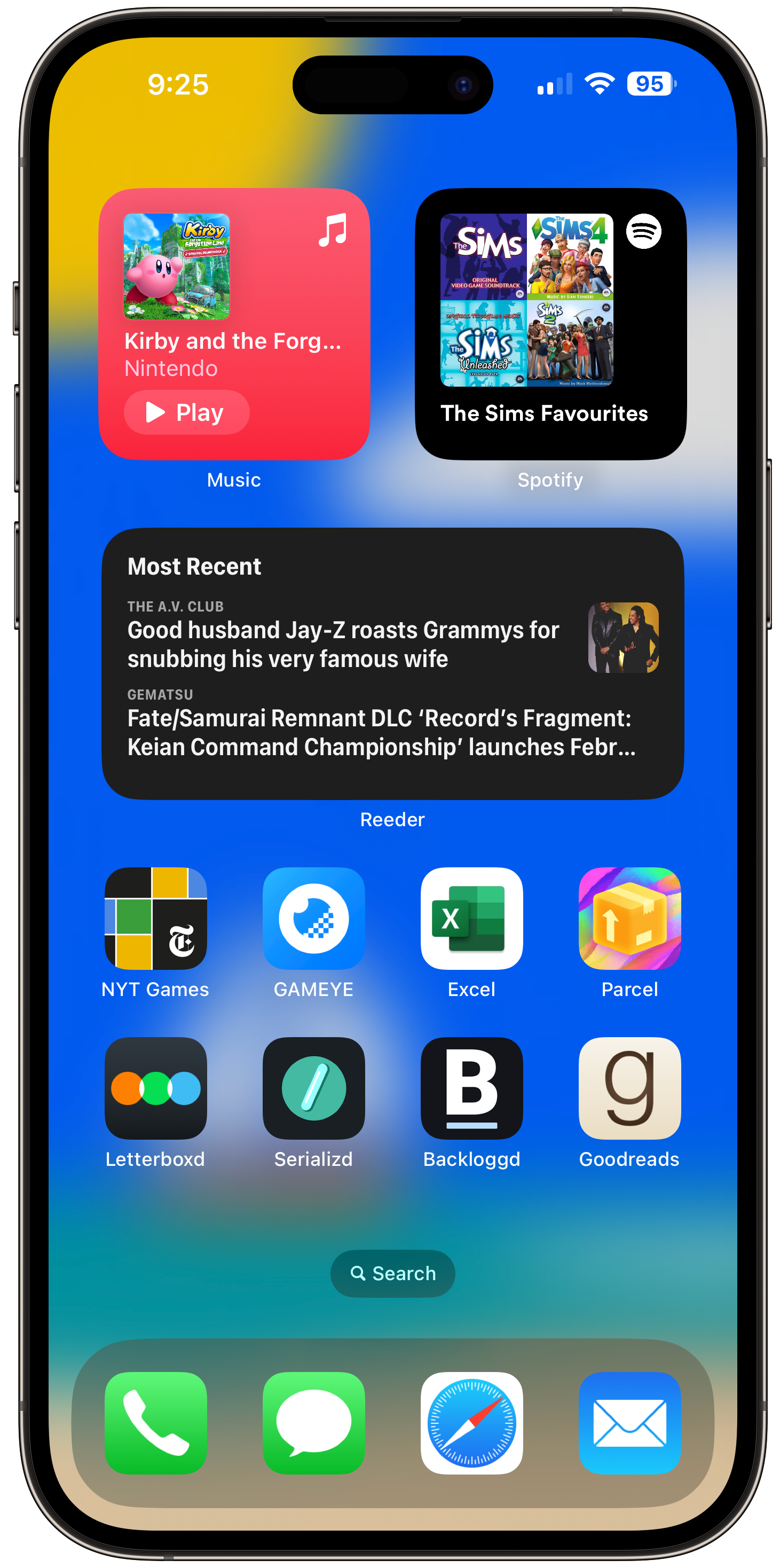
Music and Spotify Widgets
I like these as aesthetic fixtures on the top of this screen, even if I rarely tap into them (I just use the icons on the first screen). It’s nice that they’re always updating with whatever I listened to last.
Reeder Widget (link)
Reeder is my RSS reader of choice. It’s got a lot of nice features, but also keeps it simple. I keep it here as a widget as a reminder to actually check in on my RSS feeds, and it actually works for me.
NYT Games
I keep this app here as my daily reminder to open it and keep up my Wordle streak. I’ve been playing Connections too (which I’m glad does not track my streak, because it’s a harder game).
GAMEYE (link)
GAMEYE is a fantastic app for game collectors. I have a modest game collection (focused on games I want to play, not value) and numerous times I’d end up at the store, unsure on whether or not a game I was eyeing up was already sitting at home on my shelf. GAMEYE has a lot of great features for easily tracking your games and browsing your collection, and has a tiny but dedicated team working hard on growing the app.
Microsoft Excel
I use several spreadsheets to track various things, and I need easy access to the app to quickly update whichever spreadsheet I need.
Parcel (link)
I’ve used Parcel to track my deliveries for awhile. I used to use Deliveries back in the day, and then I stopped tracking them for a while. When I started again, Deliveries had gone downhill and I decided to try Parcel. The Amazon integration makes it easy to track most of my packages since it’s automatic, and anything from elsewhere is usually handled well in the app. I definitely recommend Parcel.
Letterboxd
Letterboxd and the next 3 apps are all in the same category of media tracking. I’ve fallen in love with media tracking starting late 2021, and it’s rewarding to keep track of everything I’ve watched throughout the year. I know that I watched more movies in 2023 than 2022 and that’s cool, because I struggle to commit to movies sometimes so I’d like to keep that momentum up this year.
Serializd (link)
Serializd is fairly new, and its main appeal to me is that it’s Letterboxd but for TV Shows. I’ve enjoyed this one as well, but I get a little overwhelmed by tracking stuff by episode, so it’s mainly a checklist for me a lot of the time, I haven’t added any reviews or anything.
Backloggd
This one’s just a bookmark to the Backloggd website, because there’s no app. Similar to the above, Backloggd is a lot like Letterboxd for video games, down to some very similar design on the website even. Which is great, because it works!
Goodreads
Using Goodreads is part of my current desire to get back into reading. It’s been hard, with so many other activities vying for my time, but I really want to make some efforts to take time away to just disconnect and read. It’s hard. But anyway, Goodreads is nice as it encourages me to read in the same way the other 3 services encourage me, and seeing other friends reading helps this too.
Today Screen
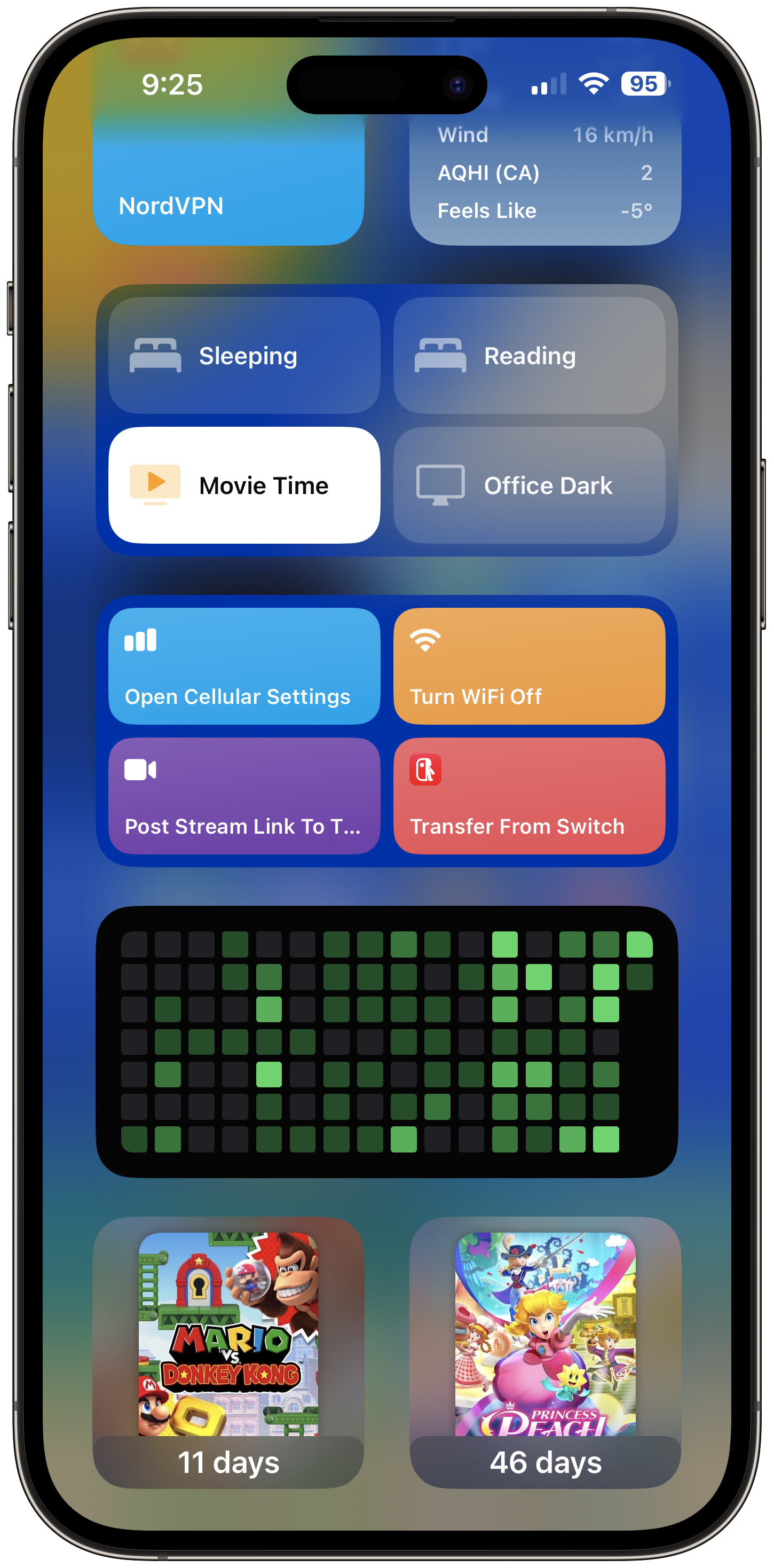
I’ve been making more use of my Today screen. Especially now that we have interactive widgets, it’s useful to have things there I can just swipe over and tap. I’ve got my VPN shortcut up top, which I use instead of their widget because sometimes I just want to tap into it rather than toggle it on or off. Next to that I’ve got the simple weather widget, which is all I need most of the time. Next, I’ve got a Shortcuts widget set up with 4 scenes I use most. These are quick controls for turning on or off lights to match particular settings, including turning my lights off at night for bed. This widget is a stack, I’ve got 2 more behind it with individual smart home controls, for individual light controls and other things. Below, I’ve got a few shortcuts for some other actions, including quick access to cellular settings to check my data usage, a full off for WiFi (instead of the temporary toggle in Control Center), a shortcut that lets me quickly compose a tweet for when I go live on Twitch, and a shortcut to open the transfer functionality in the excellent app SwitchBuddy (which helps ease the screenshot transfer process from Nintendo Switch). I don’t use these ones too often, but just enough that they’re nice to have. Finally, some countdown widgets from the aforementioned SwitchBuddy app for whichever upcoming Nintendo games I’m keeping an eye on.
Lock Screen

Phew! I ended up writing way more here than I expected, if you’ve stuck around this long, thank you! One last shout out, my wallpaper on my Lock Screen is from the lovely Wallaroo app (by Iconfactory) which offers up cool wallpapers for your devices. There’s a subscription, but they do good work and deserve your support!
That’s it! I’m always looking for cool new apps to introduce to my daily flow, and my Home Screen is likely to keep changing as time goes on, so I’d like to do another check-in like this somewhere down the line. Also, if you want to share your own Home Screen setup, feel free to reply wherever I share this post!